The CMMS, pared back to the essentials.

Work orders, preventive maintenance, assets, parts, reports. A mobile app for the field. AI that drafts your procedures. Nothing more — nothing less.

Free trial · no credit card · EU-hosted · GDPR

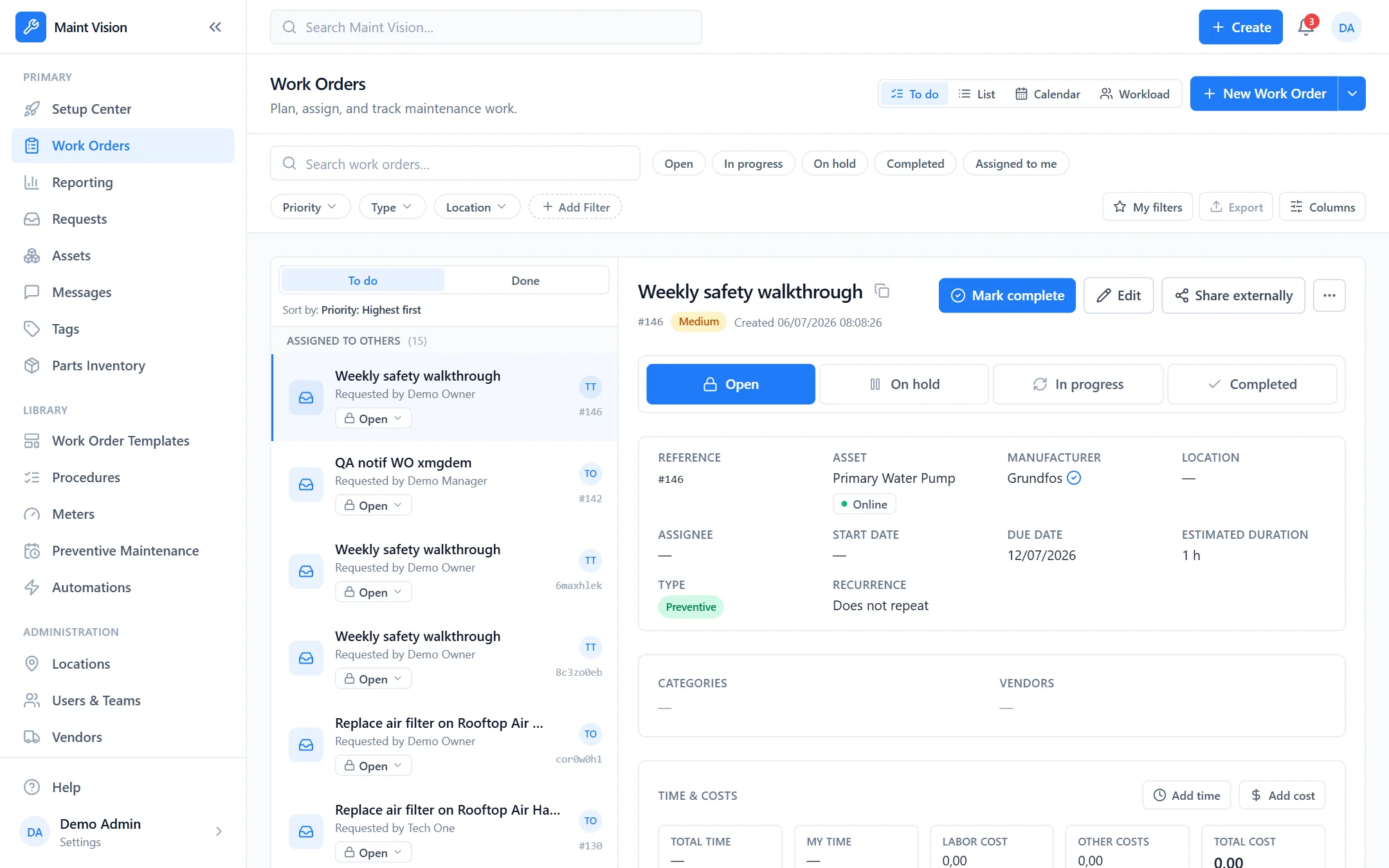
Fig. A — Work orders MV / 2026
The work orders view in Maint Vision
A real trial — no credit card
Your data exportable at any time

Two jobs. The same information.

Managers plan, technicians execute — everyone works from the same data, in real time.

A — Maintenance managers

Plan, assign, measure

A clear view of workload, costs and priorities — without chasing information.

  • Real-time work order views: To-do, List, Calendar, Workload
  • Preventive maintenance automated on every asset
  • Reports: costs, time spent, completion rates
  • Roles and permissions tuned per profile
B — Technicians

Execute in the field, on mobile

Everything needed to act fast and log work properly — right from the phone.

  • Clear work orders, with procedures and checklists
  • Scan an asset’s QR code → its record and history
  • Photos, parts used and time spent in two taps
  • Built-in team messaging
Getting started

From sign-up to your first work order.

Three steps. No integration project, no consultant.

№ 01

Create your workspace

One email, one password. Your organization is ready, hosted in Europe. No credit card.

№ 02

Add your assets

Enter a machine, or import your list from a spreadsheet. Print the QR codes and stick them on the floor.

№ 03

Raise your jobs

Create a work order, set the preventive schedule, assign a technician. The AI drafts your procedures. You’re off.

First work order in minutes · spreadsheet import · no installation

0 modules everything included, AI too
AI built in included, never an add-on
Web + Mobile from office to field, live
EU · GDPR hosted in Frankfurt

Seven modules. One system.

Each module feeds the next: the QR scan opens the record, the record drives the PM schedule, the schedule raises the work order, the job consumes stock, the report measures it all.

The product, on screen.

No mockups: real screenshots of the application, exactly as it runs today.

The schedule that reschedules itself

Month or week view, priority color coding, drag-and-drop to move a job in one second.

Fig. B — Calendar MV / 2026
The work order calendar in Maint Vision

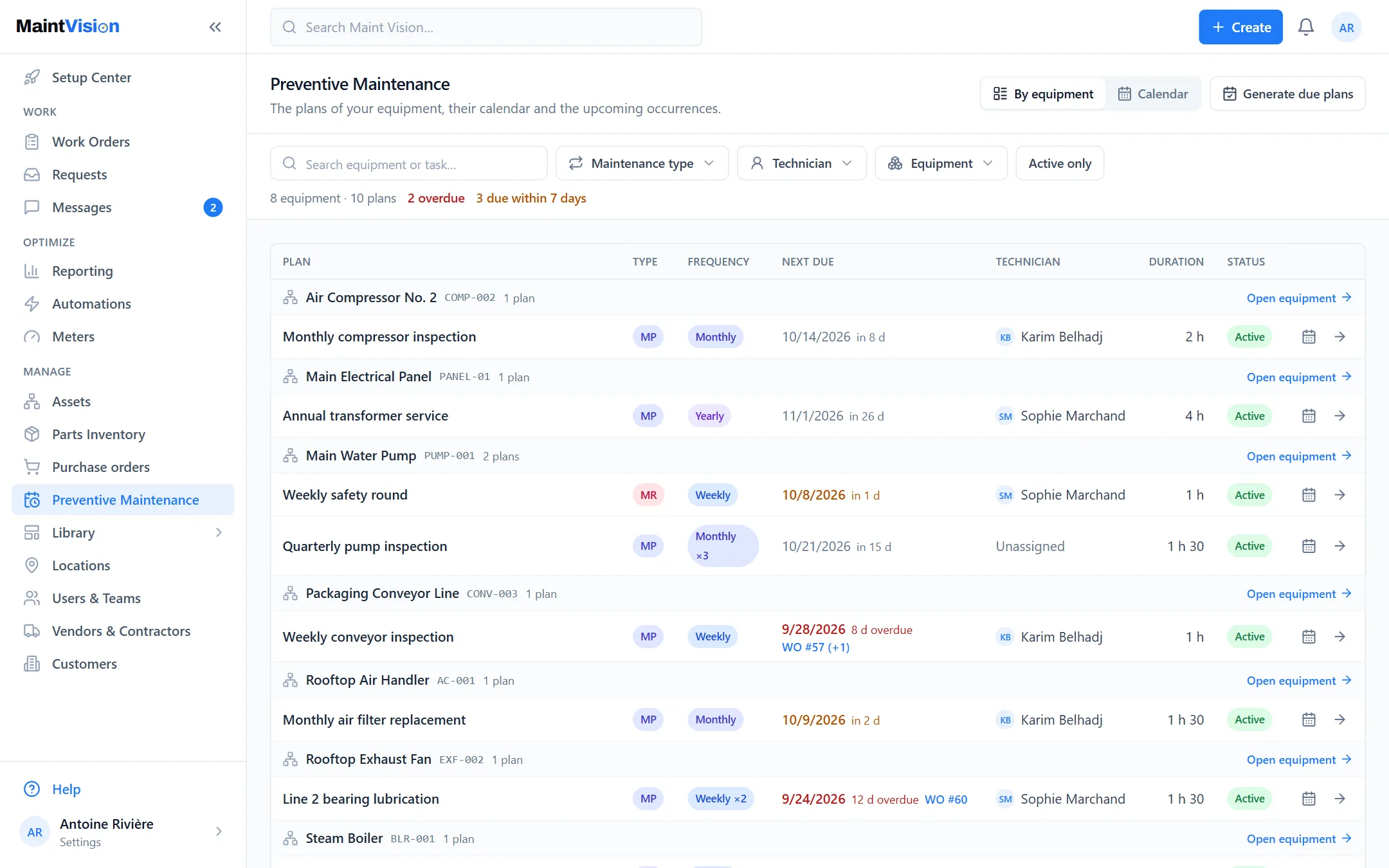
PM, set on the asset itself

Frequencies, procedures and triggers live on each machine’s record. Due work orders create themselves.

Fig. C — Preventive MV / 2026
Preventive maintenance on an asset in Maint Vision

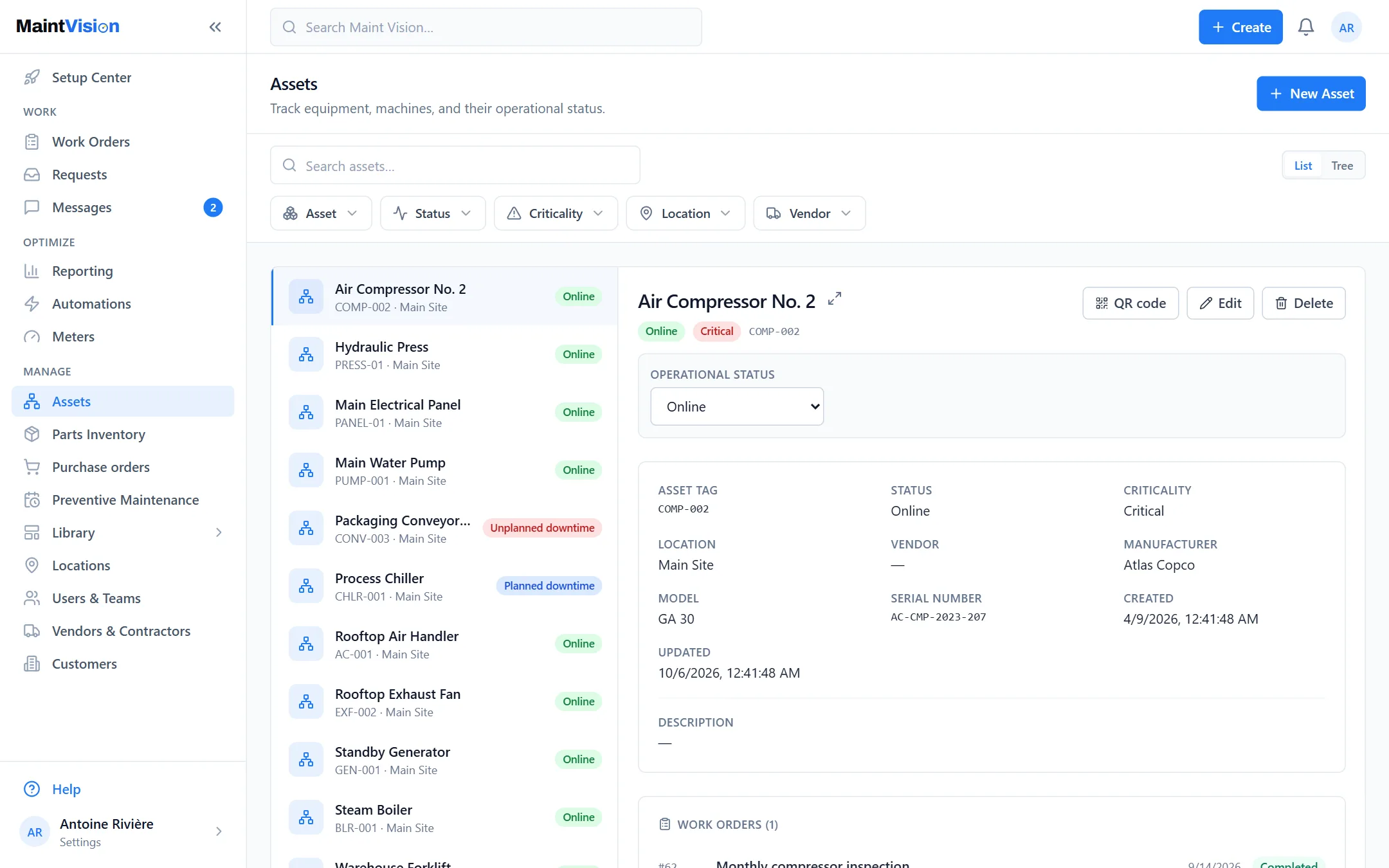
Every machine has its record

History, status, criticality, documents, printable QR code — the shop floor and the office look at the same record.

Fig. D — Assets MV / 2026
The asset registry in Maint Vision

Stock stays accurate, without spreadsheets

Stock levels, reorder points, per-job consumption and tracked movements — no more ghost parts.

Fig. E — Inventory MV / 2026
The parts inventory in Maint Vision

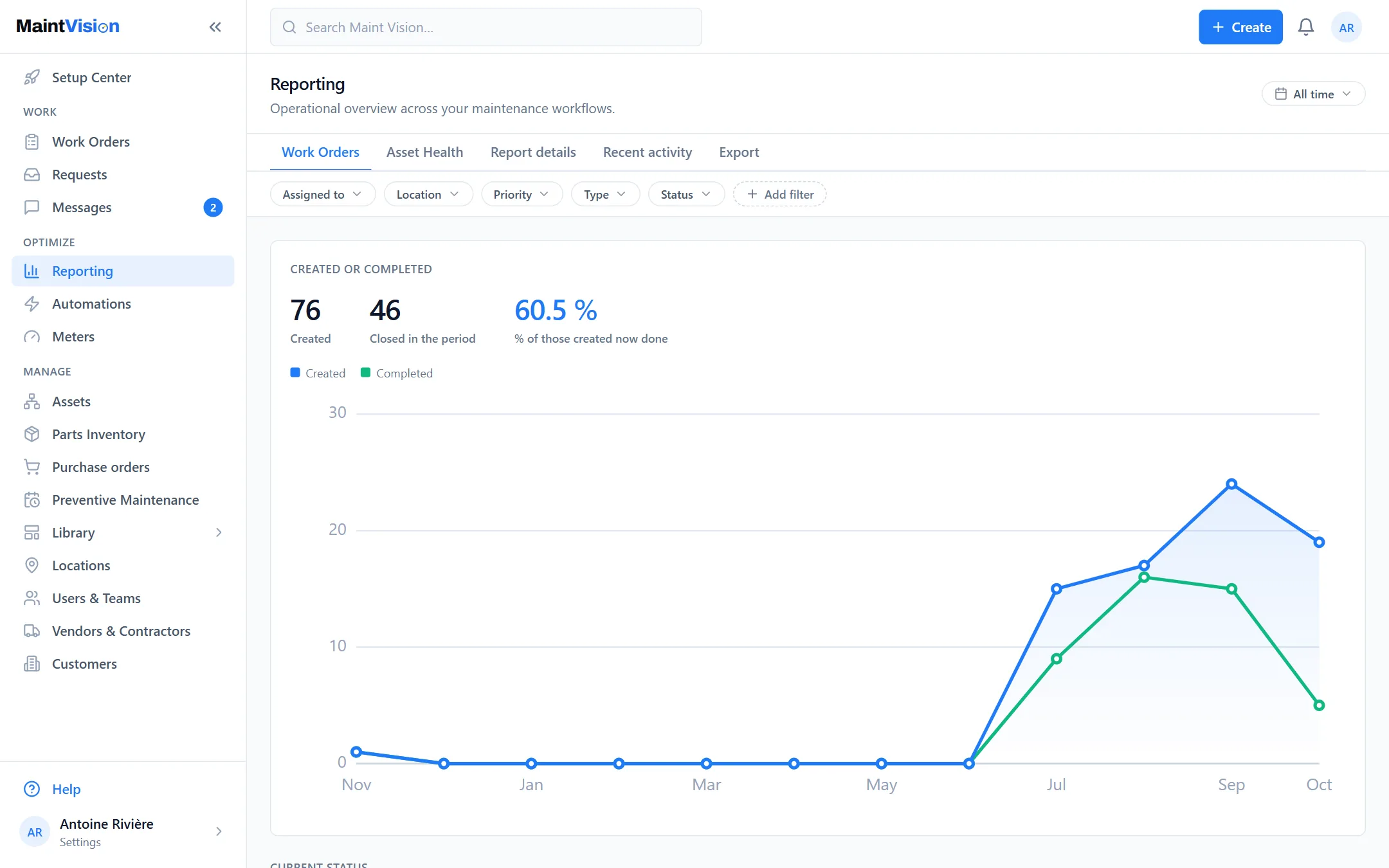
The numbers that drive decisions

Costs, time spent, breakdowns by status, priority or type — exportable, ready for the management review.

Fig. F — Reports MV / 2026
Reports and KPIs in Maint Vision

A system that assembles itself.

Your maintenance data no longer lives in four disconnected tools. Assets, jobs, stock and measurement lock together — on scroll, as in daily use.

Exploded view — system assembly
Reports & KPIs MEASURE
Jobs & preventive EXECUTION
Assets & inventory ASSET BASE
Maint Vision FOUNDATION — WEB · MOBILE · AI

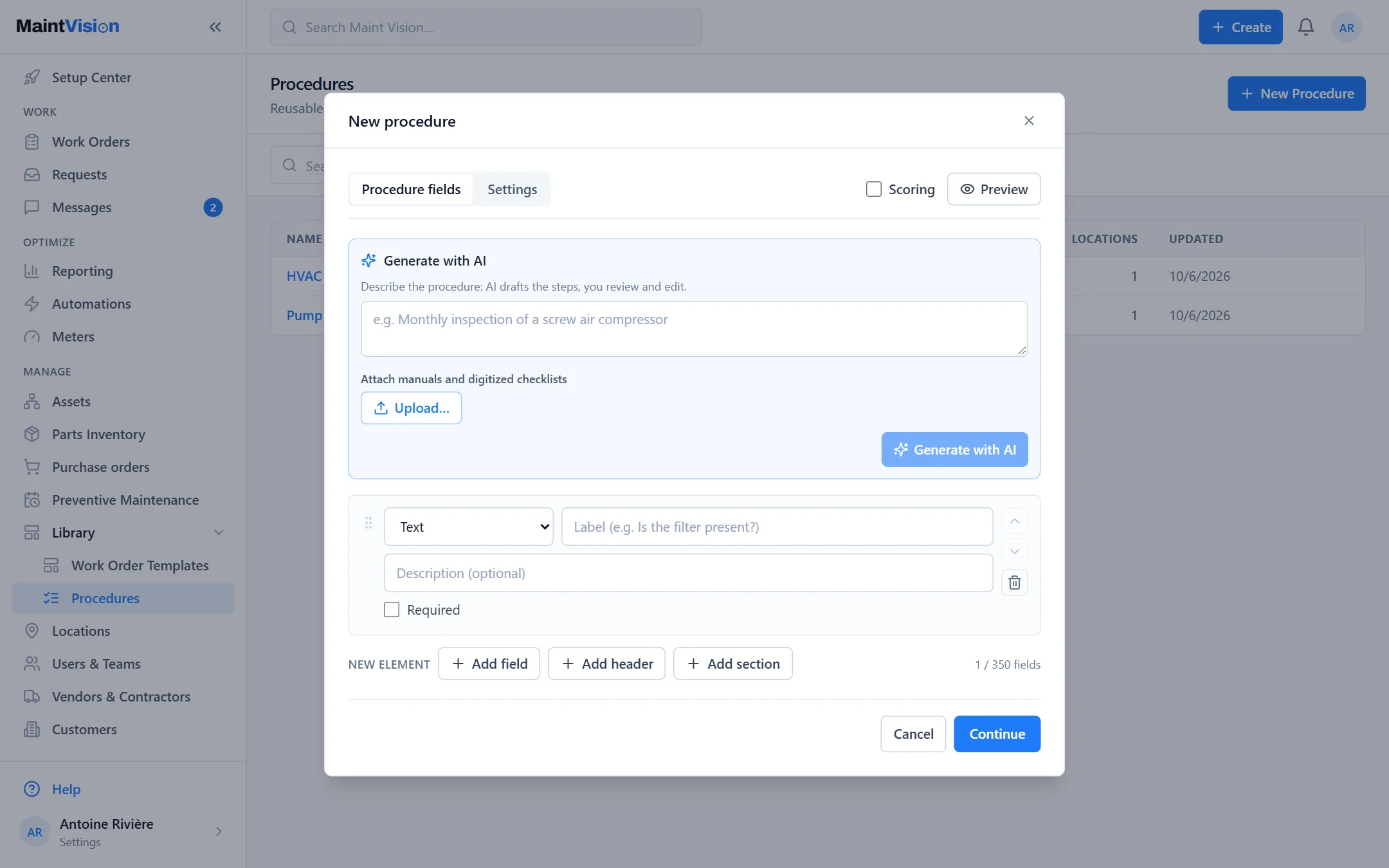
AI writes. You approve.

Snap a photo of a manual, an SOP or a paper checklist — or drop the PDF. Maint Vision drafts the full procedure with properly typed steps: measurements, checkboxes, signatures. Nothing ships without your review.

$ maint-vision ai generate
← pump_SOP_P-204.pdf (2.1 MB)
⟶ analyzing document…
✓ 12 steps · 4 measurements · 1 signature
✓ PROCEDURE GENERATED — ready to review
Fig. G — Procedure generator MV / 2026
The AI procedure generator in Maint Vision

Works in English and French. Included — not sold as an add-on.

Try the AI procedure generator yourself.

Try for free
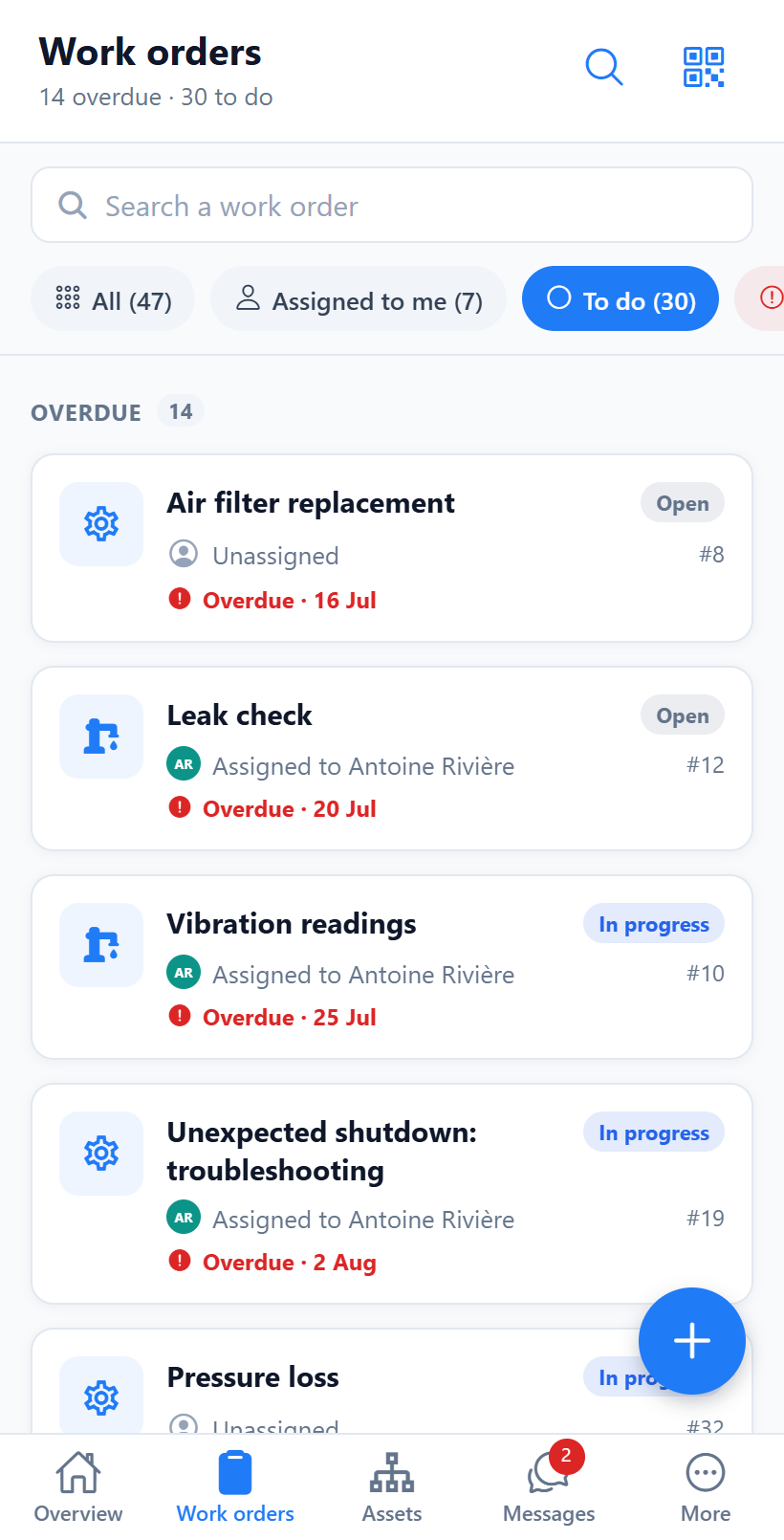
Mobile app

The field carries everything.

The Maint Vision mobile app goes with the team into the field — designed for shop-floor reality, not for a desk.

  • A clear “My work” list, sorted by priority
  • Scan an asset’s QR → its record and history
  • Before/after photos, checklists, time spent, parts used
  • Maintenance requests and team messaging

Included in your subscription, in English and French.

Fig. H — Mobile app MV / 2026
The Maint Vision mobile app in the field

What the spreadsheet can’t do.

Without judging anyone: here’s where paper and Excel hit their limit.

Spreadsheet & paper Maint Vision
Preventive work Kept in your head Triggers itself
In the field Re-typed at the office that evening Logged on mobile, live
Machine history Scattered One QR code → the whole record
Stock “We thought we had some” Deducted on every job
Numbers for management A file to rebuild Exported in one click
Who did what Untraceable Timestamped audit log
Rev. A — Founder’s note

A real product, not a promise.

Maint Vision runs in production today: what you see on this page are real screenshots of the application, not mockups. We’re just starting out — so you won’t find client logos or fake five-star reviews on this site. We’ll only put here what’s true. In return: the trial is real and complete, no credit card, and your data stays exportable at any time. A question, a doubt, a migration from a spreadsheet? Write to me, I answer.

— El-Mahdi Benhammou, founder of Maint Vision

Serious about security, from day one.

Your maintenance data is critical business data. It is treated that way.

HOSTING

European hosting

Customer data hosted in the European Union (Frankfurt).

GDPR

GDPR compliance

Your data is yours — never resold, no surprises.

ENCRYPTION

Encryption

Encrypted traffic (HTTPS/TLS) and secure sessions.

ACCESS

Roles & permissions

8 roles and a permission matrix adjustable per organization.

AUDIT

Audit log

Every sensitive action is traced: who, what, when.

ISOLATION

Multi-organization

Strict data isolation between organizations.

The questions we get asked.

Q.01 How much does it cost?
The trial is free and needs no credit card. A public pricing grid is coming; in the meantime, open a workspace and test with no commitment — we’ll share the price transparently, with no drawn-out quote.
Q.02 We’re coming from a spreadsheet or paper — is it hard to migrate?
No. You import your asset list from a file, and you start. Need a hand? We help you with the handover, for free.
Q.03 My technicians aren’t IT experts.
The mobile app is built for the shop floor: scan a QR code, take a photo, tick a box. Nothing to learn — if you can send a photo, you can use it.
Q.04 Does my data belong to me?
Yes, entirely. No resale, no advertising use. You export your data whenever you want. Hosted in the European Union (Frankfurt), GDPR compliant.
Q.05 Is it really a finished product?
Maint Vision runs in production today: all seven modules are operational and AI is included. The screenshots on this page are real.
Q.06 What if it doesn’t suit us?
No commitment, no card to enter to test. You stop whenever you want and you leave with your data.

Ready to modernize your maintenance?

Create your workspace for free and raise your first work order within 5 minutes.

No credit card · No commitment