Report a fault with one scan, no account
Breakdowns are first seen by people who will never open a CMMS: operators, production teams, cleaning staff. Maint Vision gives them a direct channel. A QR code stuck on the machine opens a public form: they describe the fault, and the request enters your normal triage flow.
Live in production today · Link revocable at any time · Protected against bots
The first witness of a breakdown has no CMMS account
A leak gets spotted in passing, an unusual noise is heard from the line, a warning light comes on in front of the operator. These witnesses have no license, no app, and no wish to install one. The classic outcome: the fault is passed on by word of mouth, gets distorted, or waits until tomorrow. QR fault reporting gives them a direct channel, without asking them for any account.
One printable reporting QR code per asset
Each asset has its own public reporting link, with a QR code ready to print. You stick the label on the machine, the cabinet or the line. The code identifies the asset: the request it produces is already attached to the right machine, with nothing for the reporter to search for or pick.
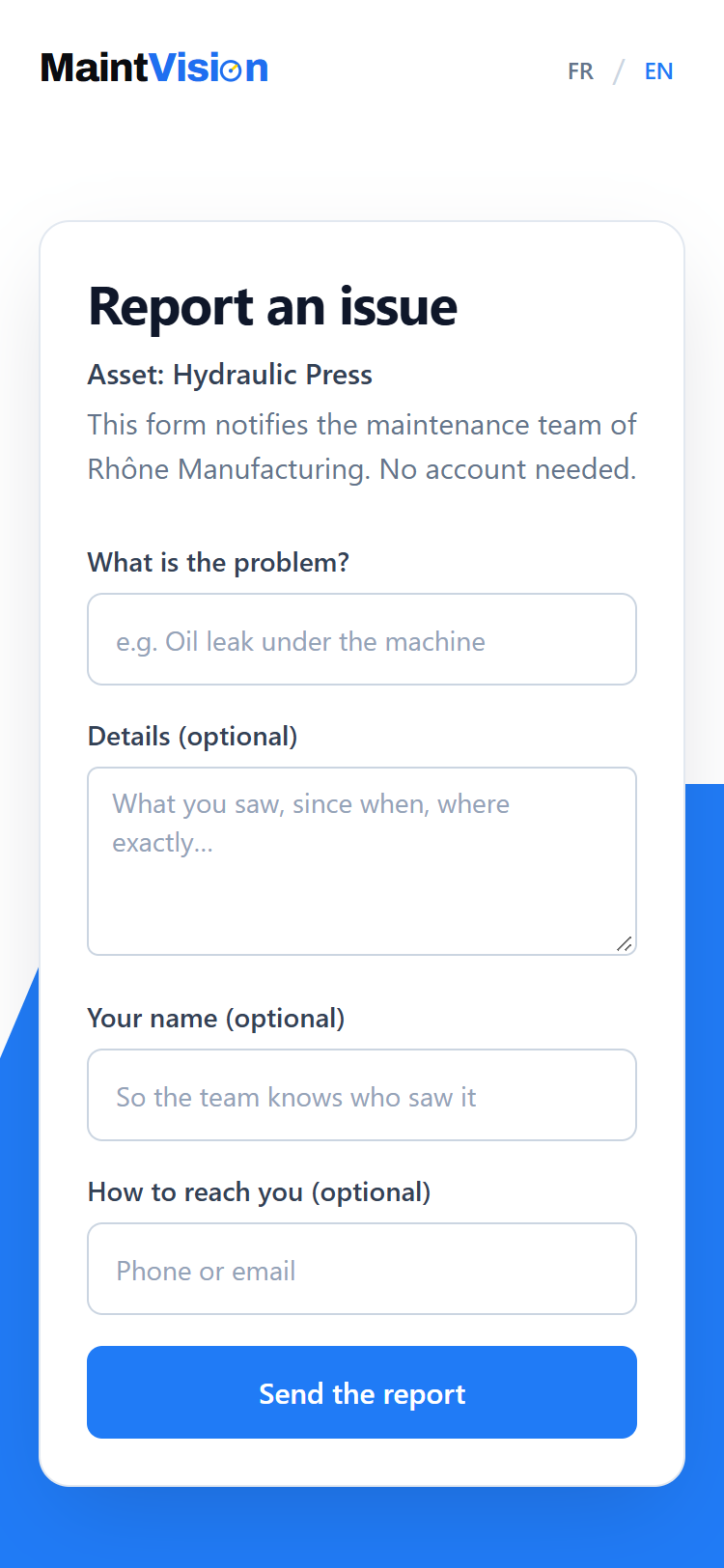
Scan, describe, send: the form fits on one screen
The scan opens a web page in the phone’s browser. No account, no install. The person describes the problem, adds details if they wish, leaves their name and a way to reach them. One button, and it’s sent. The form is deliberately short: reporting has to take less than a minute, or people stop reporting.
The request enters your normal triage flow
The report lands in the Requests module, like any internal request: attached to the asset, timestamped, with the details and name the reporter left. The manager sees it, approves it and turns it into a work order, or declines it. Nothing parallel to watch: one single flow for every request.
A revocable link that does not expose your data
The public page shows only what reporting requires: the name of the asset concerned, the name of your organization, and the form. No asset list, no history, no access to any of your other data. Each asset has its own link, revocable at any time: the old label then stops working. The page is also protected against bots and rapid-fire submissions.
Frequently asked questions
Q.01Do you need to install an app to report a fault?
Q.02What does the person who scans the QR code see?
Q.03Can a QR code already on display be disabled?
Try this feature on your own equipment.
Create your workspace for free, no credit card: 30 days with every module except AI, for up to 2 users.